
Isolated Linux machines for agents. On your laptop, your servers, or our cloud.
A dock is a Linux machine with a persistent disk, a stable ID and an optional name. You create it, run commands in it, stop it (the disk stays, compute is released), resume it with the same files, and branch it into copies.
curl -fsSL https://usedock.io/install | sh     # Linux, macOS
irm https://usedock.io/install.ps1 | iex       # Windows (PowerShell)
Both installers verify the release checksums and cosign signatures before installing the dock CLI.
With no account, dock runs docks on your own machine (the built-in local context). You need QEMU and KVM on Linux (x86_64 or arm64), or QEMU and Windows Hypervisor Platform on Windows x86_64; dock doctor tells you what is missing.
curl -fsSL https://usedock.io/install | sh
dock new demo
dock exec demo -- uname -a
The first dock new downloads the default ubuntu-24.04 Dockyard image once. On Windows, install with the PowerShell line above.
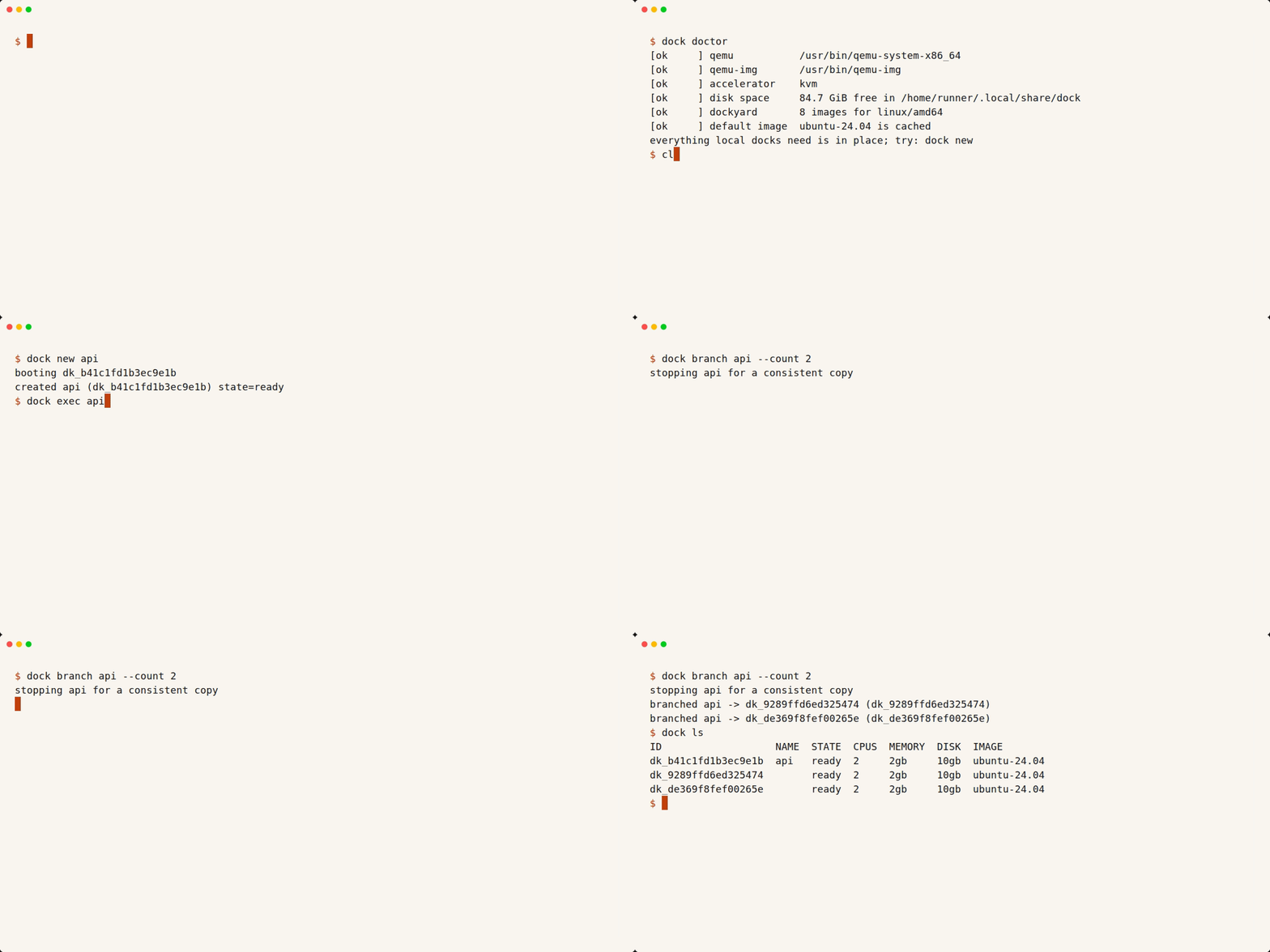
The first dock new downloads the image; the recording skips that wait.
Docs: quickstart, CLI, local docks, self-hosting, Dockyard images, connectors, SDKs, API.
Questions and ideas: GitHub Discussions.
Status: pre-release. Interfaces may change until the first public release; from then on
/v1only grows. ThedockCLI ships as signed release binaries. Local docks work on Linux (x86_64 or arm64) with KVM and Windows x86_64 with Windows Hypervisor Platform; macOS builds but is untested. Dock Cloud is coming soon; self-hosting is free. The TypeScript, Python and Go SDKs are early and not published to registries yet.
This repo is the open core: the control plane API, the dashboard, the self-host deploy and the documentation. Each dock runs in QEMU on your own machine, or in a Firecracker microVM or gVisor sandbox on a host enrolled with a control plane.
| Path | What it is |
|---|---|
apps/backend |
Control plane API (NestJS): docks, snapshots, branches, connectors, hosts, API keys, the outbound-only fleet API |
apps/dashboard |
Web dashboard (Next.js) |
deploy/self-host |
One-command self-hosted control plane with Docker Compose |
documentation |
Docs site (Fumadocs, hand-written pages) |
Docks run on hosts driven by the docklet, a separate repo. The marketing site and cloud-only code live in private repos.
| Term | Meaning |
|---|---|
| Dock | An isolated Linux machine with a persistent disk |
| Image | The disk a dock starts from: a Dockyard image (default ubuntu-24.04) or a dock you saved |
| Size | cpus, memoryMiB, diskGiB as numbers (default 2 vCPU, 4096 MiB, 20 GiB) |
| Runtime | microvm or gvisor, chosen by the host |
| Snapshot, Branch | A saved disk, and new docks started from it |
| Connector | An integration that lets agents in a dock work in another tool (GitHub first), with credentials kept outside the dock |
| Host | A machine that runs docks and dials out to the control plane |
| Context | Where CLI commands go: the built-in local engine (the default with no account), Dock Cloud, or a self-hosted control plane URL |
Requirements: Docker with Compose v2. To run docks on the same machine, Linux with Docker (gVisor) or /dev/kvm (Firecracker), and a checkout of usedock/docklet next to this repo (../docklet, or set DOCKLET_DIR).
git clone https://github.com/usedock/dock
git clone https://github.com/usedock/docklet   # only needed for --host
cd dock/deploy/self-host
./setup.sh --host                           # local: http://localhost:8088, docks on this machine
./setup.sh --url https://dock.example.com   # public instance, automatic HTTPS
setup.sh writes .env with fresh secrets, starts Postgres, Redis, Restate, MinIO, the API, the dashboard and Caddy on one origin, and waits until the API is healthy. --host also enrolls the machine as a host. More hosts join with one command each; see the docklet repo and deploy/self-host/README.md.
Beyond the quickstart, the dock CLI and the SDKs talk to a control plane: your own, or Dock Cloud (coming soon). Point the CLI at one with a context:
dock context add home --url https://dock.example.com
dock context use home
dock login                                     # paste an API key from Developers > API keys
dock new api --cpus 4 --memory 8gb
dock exec api -- bun test
dock stop api
dock branch api --count 3| Client | Repo | Install |
|---|---|---|
dock CLI |
usedock/docklet | signed release binaries, via the installer above |
| TypeScript SDK | usedock/dock-js | npm install github:usedock/dock-js |
| Python SDK | usedock/dock-python | pip install git+https://github.com/usedock/dock-python |
| Go SDK | usedock/dock-go | go get github.com/usedock/dock-go |
The SDKs are not on npm or PyPI yet. See the CLI and SDK docs.
Each app runs on its own; there is no root workspace. Bun is the package manager.
# API (from the repo root)
cd apps/backend
bun install
cp .env.example .env   # then set SECRETS_ENCRYPTION_KEY to the output of `openssl rand -hex 32`
docker compose -f docker-compose.dev.yml up -d db redis mailpit
bun run db:migrate
bun run start:dev
bun run test

# dashboard (from the repo root)
cd apps/dashboard && bun install && bun run dev

# docs (from the repo root)
cd documentation && bun install && bun run dev
CI (.github/workflows/ci.yml) builds and tests the backend, lints and builds the dashboard, typechecks and builds the docs, and scans for secrets.
Every behavior change ships with colocated *.spec.ts tests. An API change lands in the same pull request as its doc page and links the matching SDK pull requests.
Contributions are welcome. Every contributor signs the CLA (contributor license agreement); the CLA bot asks on your first pull request in each repository. See CONTRIBUTING.md.
Report vulnerabilities to security@usedock.io, not in public issues. See SECURITY.md.
AGPL-3.0-only. Third-party agent skills under .agents/ keep their own licenses; see .agents/THIRD_PARTY_NOTICES.md.
Copyright (C) 2026 Paranjay.