
High-performance CBZ optimizer built in Rust — batch resize, compress, and convert images (JPEG/PNG/WebP/AVIF/BMP/TIFF/GIF) from ZIP/CBZ/RAR/CBR archives and image-based EPUBs, fully offline. Supports animated WebP and converts animated GIFs to animated WebP while retaining animation timing and loop behavior. CLI for Windows / Linux / macOS. Windows GUI included.

Download the latest release from Releases.
| Archive | Contents |
|---|---|
cbz-tools-optimizer-vX.Y.Z-windows-x64.zip |
cbz-opt.exe (CLI) + cbz-opt-gui.exe (GUI) |
cbz-tools-optimizer-vX.Y.Z-linux-x64.tar.gz |
cbz-opt (CLI) |
cbz-tools-optimizer-vX.Y.Z-macos-arm64.tar.gz |
cbz-opt (CLI) |
Extract the archive and run cbz-opt.exe or cbz-opt-gui.exe directly. No installation is required. Linux and macOS archives remain CLI-only.
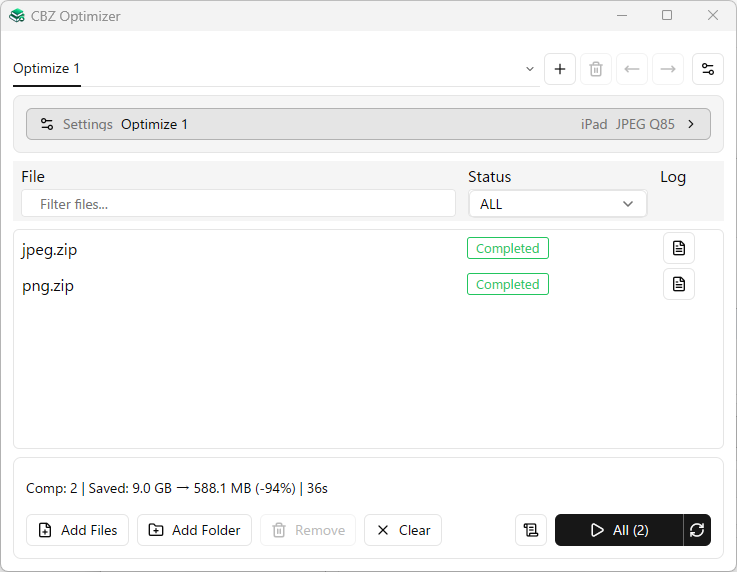
| 📦 Storage savings | Significantly reduce file size — real-world result: 9.0 GB → 588.1 MB (-94%) in 36s |
| 🔄 Format conversion | Convert JPEG / PNG / WebP / AVIF / BMP / TIFF / static GIF in bulk; animated GIFs are converted to animated WebP |
| ⚡ Speed | Parallel processing across archives and images via rayon, fast image resizing, and native JPEG/WebP codecs |
| 🖥️ Cross-platform | Windows / Linux / macOS — CLI without an installer |
| 🎯 Device-ready presets | iPad, Kindle, 4K and more — one flag to optimize for your device |
| 🤖 Script-friendly | Batch CLI with JSON output for automation and pipeline integration |
| 🖱️ GUI included | Windows drag-and-drop GUI — no CLI knowledge required |
# Basic (default: ipad preset 2048×1536, JPEG quality 85)
cbz-opt input.cbz

# Convert a RAR/CBR book to an optimized CBZ
cbz-opt input.rar

# Optimize an image-based EPUB as a CBZ
cbz-opt input.epub

# Multiple files
cbz-opt *.zip

# Kindle preset
cbz-opt --preset kindle --quality 80 --suffix _small *.cbz

# Custom size
cbz-opt --preset custom --max-width 1280 --max-height 720 input.zip

# Specify output directory
cbz-opt --output-dir ./output input.cbz# Convert static images to lossless WebP (no resize)
cbz-opt --output-format webp --convert-only input.cbz
# Convert Animated GIF entries to Animated WebP (no resize)
# Animated GIFs use a dedicated path regardless of --output-format
cbz-opt --convert-only input-with-animated-gif.zip
# Convert static images to AVIF (no resize)
cbz-opt --output-format avif --convert-only *.cbz
# Resize AND convert static images to WebP in one pass
cbz-opt --preset ipad --output-format webp input.cbz
# Convert PNG and other static images to JPEG (no resize)
cbz-opt --output-format jpeg --convert-only input.cbz
# Keep original formats for images that do not require resizing
cbz-opt --output-format original input.cbz
--convert-only: skips resizing entirely. A static image whose input and requested output formats match is passed through without re-encoding. Animated WebP is also passed through when the requested format iswebpororiginal. Animated GIF is an exception: it is converted to animated WebP even in--convert-onlymode (unless the output-size policy retains the original GIF).
| Option | Default | Description |
|---|---|---|
--preset |
ipad |
Size preset (see table below) |
-W, --max-width |
— | Maximum width in pixels (--preset custom only) |
-H, --max-height |
— | Maximum height in pixels (--preset custom only) |
-q, --quality |
85 | Lossy quality (1–100) for JPEG output and animated WebP encoding; in the GUI the common quality field is enabled only for JPEG or original without --convert-only |
-s, --suffix |
_new |
Output filename suffix |
-o, --output-dir |
(same as input) | Output directory |
-t, --threads |
0 (auto) | Number of threads (0 = half of logical CPUs, minimum 1) |
--output-format |
jpeg |
Static image output: jpeg / png / webp (lossless) / avif / original. Animated WebP remains WebP; animated GIF normally becomes animated WebP |
--convert-only |
— | Convert format without resizing; ignores --preset, -W, and -H. Matching static formats are passed through, subject to the animation exceptions above |
--resize-filter |
catmull-rom |
Static image resize interpolation: bilinear, catmull-rom, or lanczos3 |
--animated-webp-filter |
bilinear |
Animated WebP/GIF resize interpolation: bilinear (fast/smooth), catmull-rom (sharper bicubic), or lanczos3 (slowest) |
--animated-webp-keyframes |
bounded |
Animated WebP keyframe policy: bounded uses the interval below; disabled does not force periodic keyframes and ignores kmin / kmax |
--animated-webp-kmin / --animated-webp-kmax |
3 / 5 |
Minimum / maximum keyframe distance (kmax >= 2, 0 <= kmin < kmax, kmin > kmax / 2, using integer division) |
--animated-webp-output-policy |
always-use-encoded |
always-use-encoded writes the encoded animation; keep-original-if-larger retains the original animated WebP or GIF entry if encoding makes it larger |
--log-mode |
cli |
Log output: cli / silent / both / file |
--overwrite-mode |
skip |
Output conflict resolution: skip / overwrite / rename |
--json |
— | Output progress as JSON lines (for scripting and automation) |
| Preset | Width | Height | Intended device |
|---|---|---|---|
ipad |
2048 | 1536 | iPad (default) |
ipad-air |
2360 | 1640 | iPad Air |
ipad-pro |
2732 | 2048 | iPad Pro |
kindle |
1264 | 1680 | Kindle Paperwhite |
hd |
1280 | 720 | HD display |
full-hd |
1920 | 1080 | Full HD display |
four-k |
3840 | 2160 | 4K display |
custom |
(manual) | (manual) | Use -W / -H |
| Input archives | Output archive |
|---|---|
| ZIP | ZIP |
| CBZ | CBZ |
| RAR / CBR | CBZ |
| EPUB image book | CBZ |
EPUB input follows the spine reading order and includes page images referenced by its XHTML or SVG documents, with CSS image references used as a fallback. EPUB text, styling, fonts, and other non-page resources are not copied to the output. RAR/CBR input follows the same UnRAR-based handling as the companion viewer. Both RAR/CBR and EPUB produce a ZIP container with a .cbz extension.
| Format | Input | Output behavior |
|---|---|---|
| JPEG | Yes | JPEG, another selected static output format, or original format |
| PNG | Yes | PNG, another selected static output format, or original format |
| WebP (static) | Yes | WebP, another selected static output format, or original format |
| WebP (animated) | Yes | Animated WebP; may be kept byte-identical rather than re-encoded |
| AVIF | Yes | AVIF, another selected static output format, or original format |
| BMP | Yes | Converted to selected format; original can retain BMP |
| TIFF | Yes | Converted to selected format; original can retain TIFF |
| GIF (static) | Yes | Kept as GIF only if original and no resize is needed; otherwise converted (resized original → PNG) |
| GIF (animated) | Yes | Animated WebP; optionally retains original GIF if the encoded result is larger |
Static images: By default, supported static images are resized if needed and encoded in the selected output format. --output-format original uses the input format, with one exception: a static GIF needing resize becomes lossless PNG because GIF encoding is not provided. A static GIF without resize in original mode is kept byte-identical. --convert-only preserves matching static formats byte-identically and suppresses all resizing. BMP and TIFF can be retained with original or converted to another selected static format.
Animated images: Animated WebP remains animated WebP irrespective of the static --output-format. Animated GIF normally becomes animated WebP, also irrespective of --output-format. Dedicated processing paths preserve animation timing and loop behavior. --convert-only does not resize animated GIF frames, but still converts them to WebP. For animated WebP, --convert-only with webp or original passes the original bytes through. In other modes, animated WebP may also remain unchanged when no resize is necessary. The keep-original-if-larger policy can retain either an animated WebP or an animated GIF entry if the encoded result is larger; the original entry extension is kept as well.
- Launch
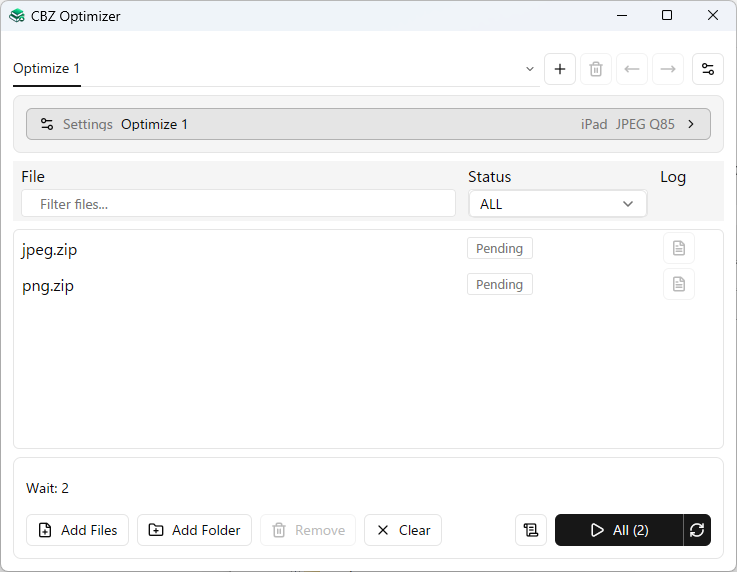
cbz-opt-gui.exeand use + to add tabs for different profiles. Right-click a tab for profile actions; each tab has its own queue and results. - Open Settings, edit General or Animated WebP, then choose Save. Cancel discards edits; Reset to defaults resets the whole profile draft.
- Add ZIP, CBZ, RAR, CBR or EPUB files with Add Files, drag and drop, Add Folder, or Ctrl+V with paths.
- Run All visible files or switch the target to Selected. Stop requests cooperative cancellation; wait for the workers to finish before starting another job.
For filters, keyboard shortcuts, detailed setting rules, logs, history, and saved-settings migration, open Help from the application menu.
 |
 |
Prerequisites (Windows): Requires the MSVC toolchain (stable-x86_64-pc-windows-msvc).
Install "Desktop development with C++" workload from Visual Studio 2022 (or Build Tools for Visual Studio).
Use the Visual Studio x64 Developer Command Prompt when the MSVC tools are not already available in your environment. .cargo/config.toml selects the native codec CMake toolchain file.
# All crates
cargo build --release

# CLI
cargo build --release -p cbz-tools-optimizer-cli

# GUI (Windows)
cargo build --release -p cbz-tools-optimizer-guiBug reports and feature requests are welcome via GitHub Issues.
Please use the provided issue templates.
Multiple ZIP/CBZ/RAR/CBR/EPUB files
  └── process archives in parallel
        └── process image entries in parallel
              ├── Static JPEG / PNG / WebP / AVIF / BMP / TIFF
              │     └── pass through if applicable, otherwise decode → resize if needed → encode
              ├── Static GIF
              │     └── keep unchanged for in-bounds Original, otherwise decode → resize if needed → encode (PNG for resized Original)
              ├── Animated WebP
              │     └── keep unchanged when applicable, otherwise animated decode → resize if needed → encode
              └── Animated GIF
                    └── frame-by-frame GIF decode → optional resize → animated WebP encode
                          └── optionally keep original GIF if encoding is larger
- EPUB image books are read in OPF spine order. Referenced page images are sent through the same optimizer settings and processing pipeline as archive images; EPUB output uses the existing CBZ naming and overwrite rules.
- In normal mode, static images within the dimension limit are generally re-encoded to the selected format;
originalstatic GIF is an exception and remains byte-identical when no resize is needed. Use--convert-onlywith a matching output format to retain unchanged static image bytes. - Animated WebP and GIF have dedicated animation pipelines that preserve frame timing, loop count, and animation. They do not necessarily honor the selected static output format.
- Animated GIF frames are decoded and encoded sequentially. GIF animation is converted to animated WebP unless
keep-original-if-largerretains it;--convert-onlyleaves canvas dimensions unchanged. - JPEG DCT pre-scaling is deliberately conservative: the final target dimensions receive a 20% guard, and only 1/4, 1/2, or full decode are considered so the DCT result does not undershoot the guarded target.
- Each archive is processed independently; one failure does not abort others.
- Default thread count is half of logical CPUs to avoid saturating the system (override with
--threads N). - Output file conflict is controlled by
--overwrite-mode(default: skip existing files). - A log file (
cbz-opt_YYYYMMDD_HHMMSS.log) is written when--log-mode bothorfileis specified. - On completion, total file size savings and elapsed time are reported.
See CHANGELOG.md.
MIT — see LICENSE.