
Give agents the work. Keep the evidence.
The engineering agent workbench · by AshlrAI.
Work with agents. Let agents work for you. One open-source workbench for your accounts, local models, chats and engineering fleet.
Install · See the workbench · Benchmarks · Read the guide · Explore the ecosystem · Star Phantom on GitHub


Canonical Phantom releases use @ashlr/phantom from ashlrai/phantom.
Install the canonical package's promoted release.
This source tree targets version 3.29.15; check canonical release availability and exact matching assets before installation.
npm install -g @ashlr/phantom   # `phm` and compatible `ashlr`; Node.js 22.15+ and Git; macOS, Linux, Windows
phm --version             # report the installed version
phm verse                 # start the console at http://127.0.0.1:7777/verse/
Current installation uses the promoted npm latest release. For a reproducible
install, select a published version from
GitHub releases and pin
@ashlr/phantom@<version>; the source candidate is not proof of publication.
Find current desktop artifacts at GitHub releases:
the signed Phantom_<version>_aarch64.app.tar.gz archive and paired
latest.json,
rather than a DMG. Match them to the installed CLI version. Qualified releases
from 3.29.8 support phm desktop install for a new Apple silicon Mac installation;
see consumer installation.
Clean-Mac acceptance remains unverified. Existing installations use the qualified signed-update flow. Maintainer
artifact installation requires the original qualified bundle and prior
Stop/drain and Quit; downloading the archive alone is not that installation.
See desktop installation. The app is locally signed,
not Apple Developer ID notarized. The CLI includes the browser console on macOS, Linux and Windows.
See desktop installation or the
first-run guide.
phm.dev introduces the Phantom workbench; phm.dev/secrets introduces Phantom Secrets. Use this repository and its qualified releases to install the workbench. Website availability does not establish installed fleet or hosted-service readiness.
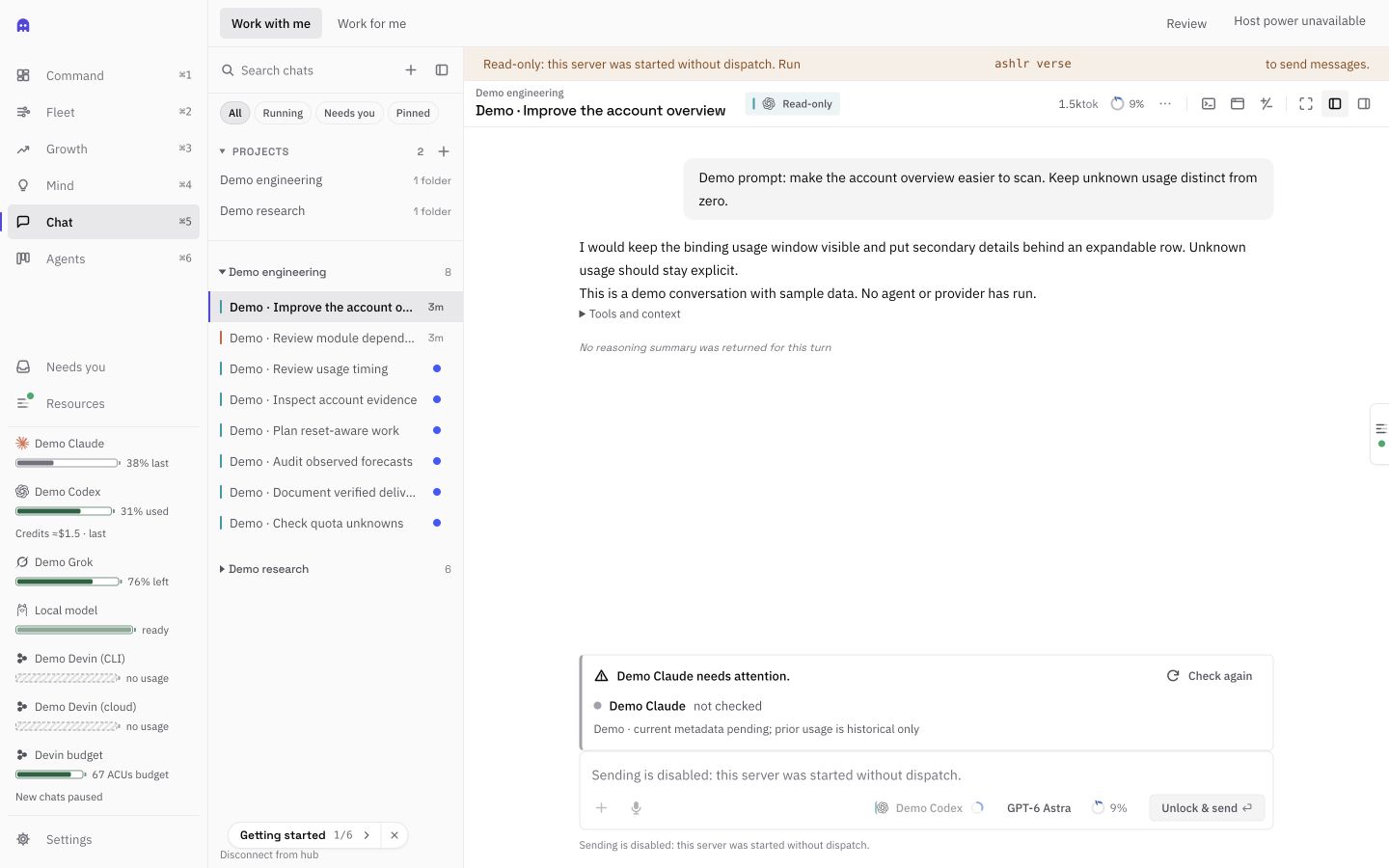
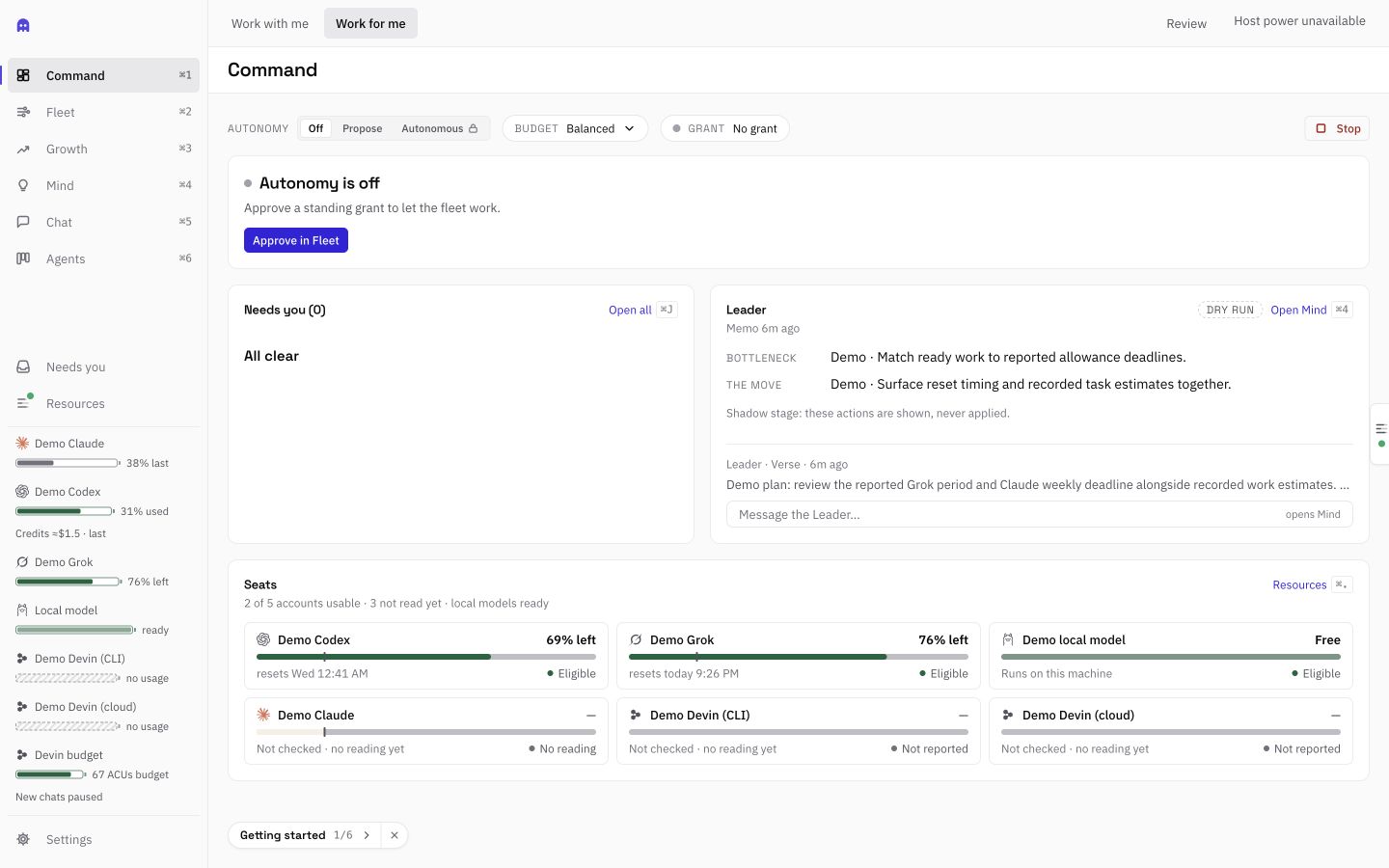
Actual compiled 3.24.3 browser UI with labeled Demo accounts, a sample conversation and an illustrative Leader memo. No provider ran and no fleet was active. Verification, merge and production are separate records; CI is unknown and release/deployment is unrecorded. These screenshots show the browser UI, not native app chrome.
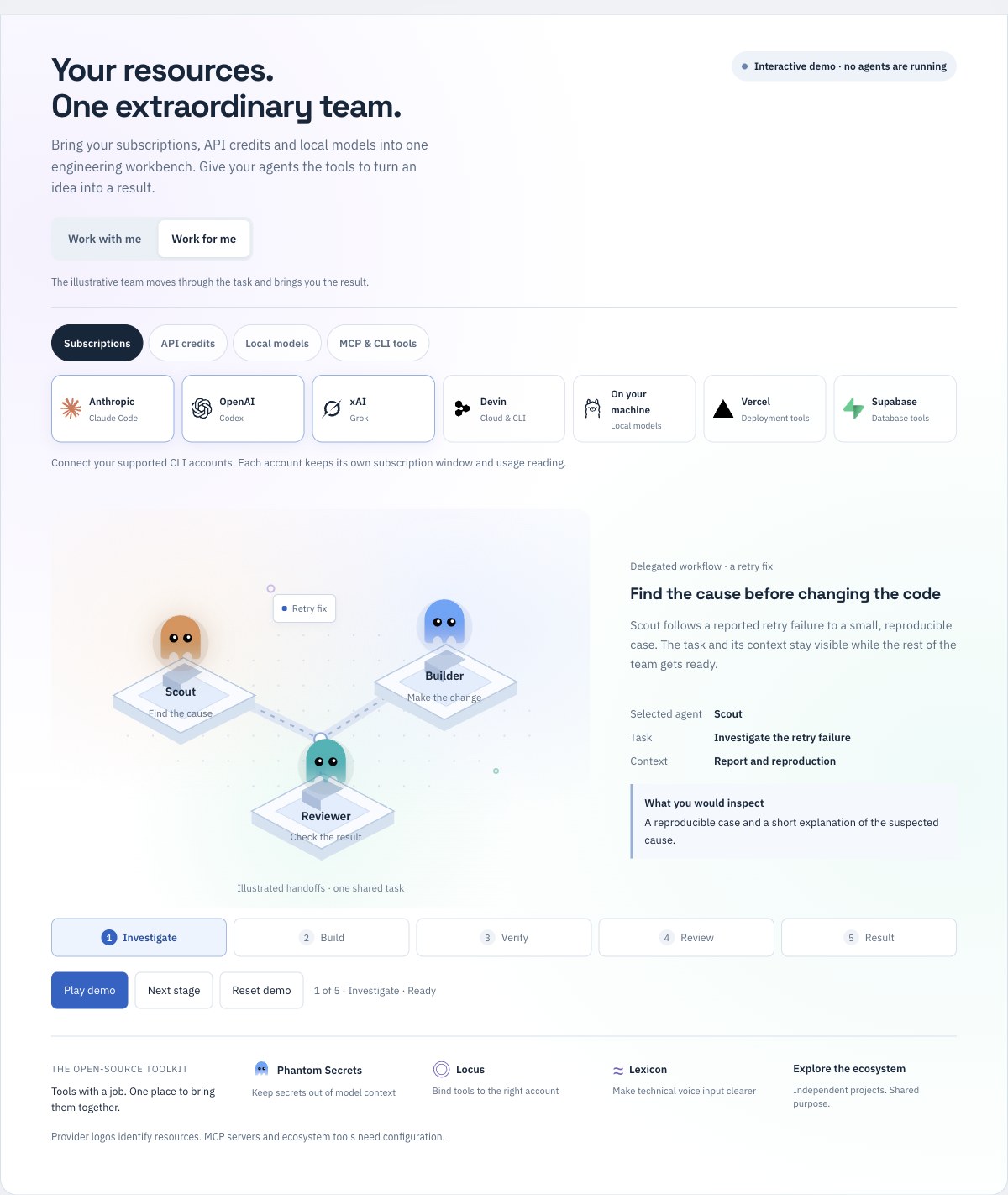
Explore the interactive agent world: subscriptions, API credits, local models and MCP/CLI tools. This illustration does not launch agents.
Phantom brings supported coding agents, accounts and local models into one workbench. Connect eligible Claude Code, Codex, Grok or Devin accounts, configure an API resource, or use a tool-capable local model. Choose a project and a small, checkable task; review the changes and results together.
CLI accounts use the vendor's configured account and billing path. API resources have their own metered billing; local inference uses your hardware. A connected account does not prove remaining subscription allowance or permission to spend purchased credits. Check each resource's readiness and budget before delegating.
For unattended work, give the fleet an outcome and observable acceptance criteria. The Leader refines priorities and briefs you in Phantom, Telegram or the terminal. The fleet works only in enrolled repositories under your current signed standing grant. A shadow stage records what it would merge; a judged ladder or eligible elite-direct stage follows the mode you sign.
It ships as a macOS desktop app and as the phm CLI (canonical package
@ashlr/phantom, also available as ashlr), which
serves the same console in a browser on macOS, Linux and Windows. Under the
console is the Phantom kernel: the CLI, the Universe experiment runtime and
account-aware resource pools.
Phantom was formerly Ashlr Verse. The current source repository is ashlrai/phantom;
the canonical package is @ashlr/phantom. phm and compatible ashlr
share the same entrypoint. Published 3.25.3 remains @ashlr/hub; its existing
SDK imports, including @ashlr/hub/universe, retain their original identity.
The canonical package provides the same five SDK surfaces under @ashlr/phantom.
Existing manifests, schemas, stores and credentials are not renamed. Published
3.25.3 uses Phantom.app; 3.25.0 retains its historical Ashlr.app filename. See branding and compatibility.
The user guide is docs/VERSE.md.
See Automatic work for chat routing, editable outcomes and recovery.
Choose Manager in a chat’s Auto seat menu, or Enable manager on a saved Fleet outcome, for planning, delegation and review under the fleet’s current authority. Read the Manager guide.
See what is running, what was measured and what still needs permission. The desktop can request that the host stay awake during observed local chat and resident work; cloud-only sessions do not keep the host awake. Resources show Devin's reported organization consumption separately from tracked ACU budgets. Growth keeps npm retrievals, GitHub stars, traffic and release downloads in their own source windows, with stale and unavailable readings explicit.
Use allowance before resets has a global setting and per-account overrides. Off disables reset priority and reserve shrinking. On remains subject to signed reserve floors, current task fit and verified billing and execution-account boundaries. This source includes an account-bound native Claude CLI adapter with isolated filesystem tools; installation and live account acceptance are separate. Aggressive reset-time reserve shrinking remains held until its subscription-only execution boundary is verified. Codex, Grok and Devin have no verified no-spillover boundary here. Purchased credits are excluded. Grok Bot has an independent weekly allowance; it never inherits Grok Build's usage or reset. Local CPU, RAM and recorded task speed are visible in Resources; they are descriptive measurements, not yet host-load-aware routing inputs. See resource evidence. See reset controls, desktop power and Growth measurements.
Work with me opens your interactive chats: guide the agent, inspect its tools and context, review changes and continue on another account or local model. Work for me opens the fleet: describe a desired result, edit or pause it, inspect recorded runs and proposals, and guide the Leader within the authority you sign. Both workspaces share accounts and projects, and switching between them does not start work or change permission mode. The app restores the workspace you last used.
| Work with me | Work for me |
|---|---|
| Describe work in a project; Automatic chooses an eligible connected resource. Use Advanced for a manual override. | Save a desired result and observable acceptance. The Leader refines dependency-ready work across the fleet. |
| Keep projects, drafts, terminals and source evidence together. | Keep account capacity, goals, outcomes and the work needing you together. |
Automatic selects an eligible account and model for a chat. It considers task fit, available capacity, your preferences, cost basis and observed latency when available. Configured Jev advice can inform the choice; it cannot make a blocked resource eligible.
Manager coordinates delegation and review for an explicit chat or outcome. Leader sets fleet priorities, refines work and asks for your decisions. Roles select an eligible account and fitting model rather than a preferred company. Leader planning and conversation support prepared Claude Code, Codex, Grok, local models and the included native Devin CLI models. Native roles use an account-bound dispatcher; Manager stages use qualified worker adapters. Cloud Devin sessions remain a separately accounted ACU lane. Balanced mode enables included Codex allowance by default; stored per-account Off settings remain respected. Each account's model variants share its allowance, so adding a model never creates quota.
Routing retains current account, context, subscription-only billing and signed scope evidence. Unknown funding remains unavailable. Native completion traces record the selected account/model, wall time and reported tokens when present; whole-run throughput is distinct from generation tokens per second.
flowchart LR
  Chat[Your chat] --> Auto[Automatic: eligible resource]
  Goal[Your outcome] --> Plan[Leader or enabled Manager: plan]
  Plan --> Queue[Dependency-ready work]
  Queue --> Checks[Capacity, budget and authority checks]
  Checks --> Agents[Eligible agents and local models]
  Auto --> Agents
  Agents --> Evidence[Recorded runs, changes and verification]
  Evidence --> Review[Your review or authorized merge checks]
Independent ready tasks can use several admitted resources. Serving slots, account quotas, workspace isolation, budget reserves and signed authority limit concurrency; Automatic counts do not mean unlimited parallel work. Devin fleet sessions use their separate granted launcher and ACU budget.
Open Resources to distinguish chat readiness from fleet readiness and see reported usage, reset windows and the specific hold. Inspect a turn's tools, context and sources, then its diff and verification results. Reported readings, estimates and unknowns stay distinct: a running daemon, completed plan or agent's success message alone does not prove your outcome was delivered. See Automatic work for routing, recovery and permissions.
Review opens the relevant changes, sources, usage, agents or decisions without starting another run. Advanced preferences let you choose No preference limit for goal counts, goal creation, Leader daily runs and Grok lanes. Finish-first is an independent choice; changing a preference does not widen signed authority.
Connected resource rows keep a stable order, show cached readings immediately when available, with gray last meters and original timestamps while live readings refresh from shared metadata collection. Expand an account for its actual windows, reset times and freshness. Missing readings remain unknown. Operator cloud estimates and captured dollar balances have separate labels. See resource evidence.
The fleet can prioritize useful work before a qualified account deadline. It compares recorded durations for the same engine, model and task kind, checks current account headroom, and uses optional Jev advice among eligible task/account pairs. Expand Resources or Fleet capacity details to see the deadline, sample coverage, estimated fit and last recorded advice. Missing history remains unknown; quota percentages are never converted into invented token allowances. See reset-aware scheduling.
Subscription windows and usage credits are separate. An exhausted Codex subscription can still have credits: the sidebar shows current native units, spending holds and an estimated dollar value for known personal plans. Purchased credit balances do not become reset spend-down targets. Cloud-credit estimates and tracked Devin ACUs do not establish an expiration. Expand Credit balances for separate recorded API promotions, cloud gifts and purchased balances, when available. API promotions show their verified expiry date and conservative admission cutoff; their separate execution lane stays held until billing, credential binding and signed API authority are verified. A capture does not authorize spending. See resource evidence.
Expand Execution feedback in Fleet for recorded producer outcomes, proposal coverage and failure categories. A completed agent run is separate from verified or shipped work. Exact failures without proposals become stable retros and context for the Leader's existing planning loop. The panel reads shared local records in the background; it opens without waiting for a scan or calling a model. Select View timeline for bound verification, canonical GitHub PRs, authenticated merge evidence and recorded post-merge checks. Unknown CI stays visible beside local suite results; release and deployment remain unrecorded. See execution feedback.
Task fan-out has no fixed six-seat ceiling. Workspace retention defaults to 25;
ASHLR_VERSE_AGENT_CAP=none disables retention-driven automatic archiving, or
set a positive safe-integer capacity appropriate to your machine. Provider
quotas, local hardware, available ports and workspace isolation still apply.
Scheduling and cash-budget preferences no longer have the former preset UI
ceilings. The panel reports the current 64-item journal capacity per tick;
remaining work can continue on subsequent ticks.
The local module map, searchable model roster, efficiency plugin and phone
gateway remain available in both workflows.
The grant editor lets you review each listed account's enabled state, roles, reserve and session ceiling. Set 0% reserve or No session ceiling explicitly when appropriate; current usage, budget preferences and provider readiness still determine eligibility. Editing a draft does not change the live grant.
An exhausted positive cash allowance keeps eligible resident subscription and local work available without inventing dollar headroom. Actual metered or unknown-cost work waits; explicit $0 remains the loop's Stop setting.
The read-only ashlr openai-agents CLI inspects managed OpenAI Agents session
metadata with a host-held API key. API access is separate from subscriptions,
and inventory does not qualify an execution seat. See the
Agents integration guide,
Dots companion guide and
harness evolution plan for the supported
commands and next integration steps.
| What you get | Guide | |
|---|---|---|
| Talk to the Leader | One conversation across Mind (⌘4), Telegram and phm leader say. Steer work, answer single-choice, multiple-choice or short-answer questions, and interject without losing a question draft. The Leader produces briefs and plans useful work using eligible connected resources under the active grant. |
LEADER.md |
| Autonomy with custody | A Touch ID standing grant names repos, engines, change-volume limits and spend. Verified changes follow gates G0–G7; eligible agents under a signed elite-direct policy land without a separate judge. Merges are SHA-pinned, watched and reverted if red. Work for me shows the current grant and rollout state. | AUTHORITY.md |
| A multi-seat workbench | Claude Code, several Codex accounts, Grok, local models and Devin side by side, each pinned to its own profile. Auto seat, Compare, cheap-first and one-click handoff across seats. A panel of Terminal (command blocks, an Agent tab), Browser (observation by default; guarded actions under a separate grant), Changes (a checkpoint before every turn, Accept/Reject, Undo/Redo), Sources and Reasoning, plus focus mode. | VERSE.md |
| Resources, ready or not | ⌘. shows every account, local runtime, cloud credits and Devin, each with a "Chat: ready" and a "Fleet: ready · reserve kept" line and the command that fixes it. | VERSE.md |
| Cloud and Devin | Hand a scoped task to a Claude Code cloud or Devin lane for a reported PR, or chat in a separate Devin cloud or CLI seat. The signed-in Devin CLI defaults to Cognition SWE-2 High; cloud sessions use ACUs and do not report an underlying model. Lane PRs reach Needs you and the standing gates. Cloud Devin needs two judge families; eligible local CLI work can use a signed elite-direct grant. | CLOUD.md, DEVIN.md |
| A private repo wiki | A searchable local module map with dependencies and cited files, an architecture wiki per repo with verified file:line citations, and Ask the codebase. Pages are stored on your Mac; generation prefers local models, but may send repository context to Grok when the grant and repository policy allow it. |
VERSE.md |
| Lessons | Every task end becomes a retro with a root cause, swept hourly. Knowledge it suggests is used only after you approve it, and only where its scope matches. | VERSE.md |
| Playbooks and automations | Versioned task templates, run with a !macro in any chat or lane; issues, red builds, schedules and webhooks that become work, through each lane's own gates. |
VERSE.md |
| Jev decisions | One fast, typed decision layer with a rules fallback at every call site, advisory or escalate-only where safety is near. | VERSE.md |
Status, plainly. Autonomy ships dormant and is macOS-only. It turns on
after you install the custody helper, sign a grant and start the resident
daemon. The signed grant defines its stages and repository scope; a shadow
stage proposes work without merging, while an eligible elite-direct stage can
land verified changes. A release that changes authority code pauses an existing grant until
Touch ID reapproval. Check the live grant, switch, Stop state and rollout stage
with ashlr authority status; a source document cannot establish that the
resident daemon is active on a particular Mac.
Each chat turn has a compact Tools and context panel showing reported calls, MCP call counts, cited sources and recorded playbook references. The local Wiki module map links inferred dependencies to checked source lines and reports scan and resolver coverage. Both views use existing local evidence without additional model calls.
The desktop app is a native window around Phantom, with a menu-bar item,
notifications while it is hidden, a Dock badge for Needs-you items and the
Terminal pane in the chat dock. It bundles the ashlr CLI, so it needs no
separate Node.js install to run.
Use GitHub releases for the original signed arm64 app archive and paired update manifest, rather than a DMG. Match the artifacts to the installed CLI version and use the desktop installation guide for the qualified update or maintainer artifact path. The app is locally signed, not Apple Developer ID notarized, so macOS may require Open Anyway on first launch. To build from source on a trusted macOS checkout, use the local release script with the stable "Ashlr Local" code-signing identity. The prerequisites, exact build order and verification steps are in Releasing locally and Desktop app. In short, from a clean repository root:
npm ci
npm run build:binary
node desktop/scripts/prepare-sidecar.mjs
(cd desktop && CI=true cargo tauri build)
ashlr authority stop --json
# After the supported drain succeeds, quit the native app normally.
npm run ship:local -- --native
The guarded ship:local --native path handles a first install or an existing
verified app with the prebuilt native binary and local signature. It does not
compile Rust. Verify that it copied the new binary and that the installed app
reports this release. A bare cargo tauri build can wrap stale web assets.
The local build is signed with "Ashlr Local", not Apple Developer ID notarized.
macOS may still require right-click Open or Open Anyway on first launch.
The first signing setup may also ask for your login password and Always Allow
for the signing key. A small launch window says what is
happening while the bundled server starts on 127.0.0.1:7777. The Phantom window
then opens with its tokens already handed over, so there is nothing to paste.
Closing the window hides it to the menu bar; Quit stops the server.
On first launch a two-minute tour shows which seats this Mac can use, whether there is a local model, and the three ways to stop things.
A seat is one account and the CLI that drives it, pinned to its own profile so a turn can never land on the wrong account. Phantom never asks for or stores a credential; each vendor CLI signs itself in.
-
Prepare a private profile for each account. For the Claude seat the cloud lane uses:
ashlr resources profile prepare --provider claude \
  --directory ~/.ashlr/native-profiles/claude-a \
  --executable /absolute/path/to/the/claude/binary --json
Use
--provider codexor--provider grokfor those accounts, with a new directory each time. Nothing is signed in yet. -
Sign in with the
loginCommandthe command printed:auth login --claudeaifor Claude,loginfor Codex,--no-auto-update login --oauthfor Grok. Finish the vendor's browser flow as the intended account. -
List the account in
~/.ashlr/account-connections/connections.json, using thecommandfrom step 1:{ "schemaVersion": 1, "intervalMs": 30000, "accounts": [ { "id": "claude-a", "label": "Claude Max", "provider": "claude", "command": ["/absolute/node", "/Users/you/.ashlr/native-profiles/claude-a/launcher.mjs"] } ] } -
Reopen Phantom. The account appears as a seat in the composer and in Apps & Accounts, which shows its health, windows and resets. A background sweep checks every seat every 10 minutes with status commands only. Reconnect opens the seat's own login in Terminal.
Local models need no sign-in. If Ollama is running, every tag that supports tool use becomes a local seat. The account commissioning details, including how to check identity and quota, are in Resource Pools.
The same console runs from the CLI on macOS, Linux and Windows. It needs Node.js 22.15 or newer and Git.
The canonical package provides phm as the primary CLI command. Both phm and
ashlr use the same workbench entrypoint; existing ashlr scripts keep working.
When building from source, ./install.sh installs both aliases and refuses
unrelated files or links. The separate Phantom Secrets command remains phantom.
npm install -g @ashlr/phantom
phm --version
phm verse                 # start the server and open http://127.0.0.1:7777/verse/
The canonical package exposes @ashlr/phantom, @ashlr/phantom/core,
@ashlr/phantom/types, @ashlr/phantom/plugin and @ashlr/phantom/universe.
The published 3.25.3 compatibility package preserves the public SDK entrypoints @ashlr/hub,
@ashlr/hub/core, @ashlr/hub/types, @ashlr/hub/plugin and @ashlr/hub/universe.
phm verse prints two tokens. Paste the read token into the page once. It
asks for the mutation token the first time you start a chat or change
something. The server listens on 127.0.0.1 only, and neither token is written
to disk. ashlr verse --no-open --json prints one machine-readable line instead
of the banner.
What differs from the desktop app: the chat dock's Terminal pane needs the desktop app's runtime (the browser gets Open in Terminal.app instead), and the custody helper behind autonomy is macOS-only (a Secure Enclave key and Touch ID).
- Install the desktop app or the CLI (above), and open Phantom.
- Sign in your seats (above). Start
ollama servefor local seats. - Open a project. New chat (⌘N) picks a seat and a folder; in the desktop app Choose folder… opens the native picker. Saving a folder as a project never enrolls it for unattended work.
- Chat. The composer takes attachments,
@files and/commands, and queues up to 3 turns while one runs. The context meter shows the selected window and compaction point when known; its tooltip identifies reported, catalog or default values. Continue in a fresh chat hands off with a note built without a model call. ⌘K reaches every chat, action and seat; ⌘J opens Needs you. - Optionally run the local fast lane.
ashlr local-runtime start --slots 4starts llama-server with batching slots, andASHLR_VERSE_LOCAL_DISPATCH=llama-serverin the workbench's environment sends local turns to it. Model discovery stays on Ollama. - Optionally hand work to the cloud or to Devin. New cloud task on
Command, or
ashlr cloud launch "<task>" --repo owner/name(cloud lane). For Devin,ashlr devin connectonce, then a Devin (cloud) chat, Run in Devin from a chat, orashlr devin launch "<task>". - Talk to the Leader. Open Mind (⌘4), or
ashlr leader say "focus: …".ashlr comms setup-telegramadds a two-way Telegram line. - Inspect autonomy preparation with
ashlr authority setup --dry-run --jsonandashlr authority status. Guided setup can prepare prerequisites after your explicit actions; once your standing grant is active,ashlr authority resident startruns the resident fleet under it.ashlr authority protect --printreviews GitHub changes. Updates preserve existing rules, rule options and check App pins; incompatible or unfamiliar top-level policies need review. Before writing, the updater rechecks all selected existing policies and checks each again before its update. These checks reduce the race window; they are not an atomic GitHub transaction.
Autonomy ships dormant and is macOS-only: nothing runs until you install the
custody helper, sign a Touch ID standing grant and start the resident daemon
yourself. Inspect it with ashlr authority setup --dry-run and
ashlr authority status. The full commissioning path, grant limits and budget
modes are in Autonomy setup.
Verse 3.16 changes authority code. After installing, reapprove an existing
grant with ashlr authority re-approve and restart the resident service from
your terminal. Check its actual state with ashlr authority resident status;
source documentation cannot establish that it is active on a particular Mac.
Press ⌘. (or click the tab on the right edge, or run "Open Resources" from ⌘K) to open the Resources drawer: connected resources grouped by their legacy display tier. Elite, Fast and Free · local are labels, not quality or speed measurements. Shared seat selection ranks eligible resources by current headroom and independent funding, without inferring quality from a provider or model family. Cards show the available account, model, billing and readiness evidence; unknown readings stay unknown. Chat sign-in, quota collection and fleet authority are separate checks. The drawer opens over your work or pins beside it. See resource evidence for the meaning of each reading.
The resource bar keeps account allowances, separate credit balances and local resources in view. Saved Grok Bot profiles have their own reorderable entries; their allowance, reset and dispatch remain unverified and never inherit Grok Build usage. Hover a row for its evidence, or click it to inspect the resource. Drag rows to reorder them. Hide resource bar is in the drawer's footer and ⌘K.
npm run gate          # minutes, not half an hour: static checks + the tests your change can reach
npm run ship:local -- --native  # after a native build: guarded Phantom.app/current CLI migration; requires prior drain + normal Quit
For a canonical release, qualify one exact candidate and publish its original
CI tarball through the commissioned trusted-publishing workflow. Finalizing and
installing the signed desktop remains separate. npm run gate:full runs every suite. See
docs/RELEASING-LOCALLY.md.
Phantom can hand a task to a Claude Code cloud session (ashlr cloud launch "<task>") or, off by default, to Devin (ashlr devin connect, then
ashlr devin launch "<task>"). Each task is asked to deliver one draft PR, and
nothing in the cloud lane merges. Overview: Cloud and Devin lanes;
details: docs/CLOUD.md and docs/DEVIN.md.
The local Devin CLI seat defaults to Cognition SWE-2 High; the ACU-metered cloud seat does not identify its underlying model. Cloud Devin still needs the signed stage and two independent judge families for a merge. Eligible CLI work can use a separately signed elite-direct ceiling.
Run no model to inspect help or compare compatible saved reports:
ashlr benchmark --help
ashlr benchmark --compare-reports BASELINE.json CANDIDATE.json
Run a synthetic coding task explicitly against your configured local runtime:
ashlr benchmark run --task multi-file-rename --trials 1 --concurrency 1 --out report.jsonThe harness records checker results, runtime configuration, wall time, usage coverage and private request traces. Failed coding tasks return a failing exit status. Comparisons require matching tasks, runtime configuration and recorded cache conditions; missing token counts stay unknown. These are tools for measuring changes, and do not add an eval gate to fleet dispatch.
Review real project changes in the chat's Changes panel, alongside reported tool calls and source evidence. See the harness guide for offline and online boundaries, trace privacy and comparison details.
The Phantom kernel underneath the console (the Universe experiment kernel, resource pools,
the legacy enrolled-repository fleet and its activation runbook, the kill
switch, backends, sandboxing, the command reference, the safety model, the
~/.ashlr/ layout and configuration) is documented in
Phantom reference. Start with the
executable Universe demo, which needs no model account.
| Series | Theme | Status |
|---|---|---|
| v1 (M1–M20) | Local command center — Desktop index, MCP gateway, agent orchestrator, genome | Shipped |
| v2 (M21–M30) | Autonomous org — sandboxed swarms, Approval Inbox, enrollment, kill-switch | Shipped |
| v2.1 (H1–H8) | Harden and prove — adversarial test suite, safety invariants proven by tests | Shipped |
| v2.2 (M31–M33) | Agent-native — plugin system, Raycast, update channel | Shipped |
| v3-Weapon (M41–M44) | Local Weapon — adaptive model-sized prompts, sandboxed engineer tool surface, verify→repair, eval | Shipped |
| v3-Team (M34–M40) | Team Command Center — multi-machine inbox, coordinated daemons, team visibility | Spec'd, not built — see docs/SPEC-V3-TEAM.md |
| v4 (M45–M49) | Foundry — multi-backend engines, backend router, tiered-trust merge gate, HMAC provenance, fleet supervisor | Shipped |
| v5 (M50–M55) | Open Fleet — declarative engine registry, tri-tier trust, OS confinement, fleet intelligence, self-improving fleet, goal/loop conductor | Shipped |
| v5.1 (M320–M324) | Claude 5 Model Intelligence — Sonnet 5 workhorse routing, Fable 5 judge with Opus fallback, per-model ROI telemetry, cost-aware learned routing | Shipped |
| v6 (M331–M340) | Verification-First — verify-to-green repair loop, real-world outcome watcher, multi-model best-of-N, gateway shadow activation program, Models dashboard tab, SWE-bench regression gate | Shipped |
| 3.5–3.8 | Ashlr Verse — the operator console, local seats on llama.cpp, a native folder picker, bounded run windows, local-only that actually prevents spend | Shipped |
| 3.9 | Context — windows read from each CLI, visible compaction, standard and expansive modes, continue in a fresh chat, shared project memory | Shipped |
| 3.10 | Autonomy with custody and the workbench — Touch ID grants, budget modes, the Leader, five surfaces, ⌘K and ⌘J, the dock, live reasoning, charts, burn-down history | Shipped |
| 3.11 | The cloud lane: Claude Code cloud sessions on Claude credits, with an estimated budget and self-improvement. Also the Resources drawer (⌘.) and the always-on resource bar, provider logos, the Ashlr.AI mark, a 349 KB first paint, and npm run gate / npm run ship:local |
Released |
| 3.12–3.13 | Your key is the trust root; guided ashlr authority setup; the host-verified ashlr/verify check; cloud PRs into the standing gates; the resident runtime under a standing grant (ashlr authority resident start) |
Shipped |
| 3.14 | Talk to the Leader in Verse, Telegram and the CLI; Leader reliability; accounts ready in both chat and fleet; the rollout ladder on Command and shadow decisions on Fleet; local enforcement for free-plan private repos; file:../ sibling dependencies; a sidecar that cannot freeze; chart polish |
Shipped |
| 3.15 | Founder-mode Leader; Devin as chat seats, a lane and a fleet producer under a two-judge rule; the workbench panel (terminal blocks, browser, checkpoints, sources and reasoning); every seat together; playbooks and automations; the Jev decision layer; retros and approved knowledge (Growth ▸ Lessons); a private repo wiki and Ask | Included in the published 3.16 release |
| 3.20 | Reset-aware task/account choices, recorded work estimates, Jev advice and optional decision-call preferences | 3.22.0 release |
| 3.24 | Automatic awake during observed local work, organization consumption, source-qualified Growth and explicit reset controls with execution-binding holds | 3.24.0 release target |
| 3.23 | Automatic chat, editable desired outcomes, dependency-ready fleet work, preserved local context and current-outcome review/merge checks | Published 3.23.0 |
| 3.19 workbench changes | Faster progressive resource readings, expandable usage details, optional goal and Leader preferences, Review navigation and explicit benchmark commands | Included in 3.22.0 |
| 3.18 | Work with me and Work for me, configurable fleet volume, scalable workspace retention and comparable usage reports | 3.18.0 release |
| 3.17 | Local module map, scalable account/model rosters, portable efficiency-plugin connection and phone reliability | 3.17.2 release |
| 3.16 | Native Agents workbench and guarded computer tools; optional authenticated phone gateway; reviewable learning evidence; Devin CLI SWE-2 High default; local signing and release fixes | 3.16.1 published |
CLI archives are built by hosted CI. As a dated release example, the commissioned trusted publisher published
@ashlr/phantom@3.29.7 on October 10, 2026 in run 38025950740, attempt 1,
with public registry-byte, provenance, consumer and latest checks. The signed
macOS app was finalized and installed separately from the same qualified source.
See the release procedure.
The public website shows the Phantom workbench; Phantom Secrets has its own page.
Automatic website publisher commissioning and connected-provider activation remain separate acceptance steps.
A legacy @ashlr/hub response does not prove canonical publication.
GitHub release assets require their own public download and checksum verification;
repository or changelog state alone is not publication evidence.
Phantom is the flagship workbench. These related open-source projects solve different parts of a developer's workflow and remain useful on their own:
Explore the interactive ecosystem page for a dated, GitHub-sourced star history of these six repositories and their sum.
| Project | What it helps with |
|---|---|
| Phantom | Coordinate coding agents, accounts, local models and guarded fleet work from one console. |
| Phantom Secrets | Manage credentials; configured token/proxy paths can keep real keys out of agent context. API adapters may still reveal a key in-process for a call. |
| Locus | Check configured account and session identity; its off, warn, enforce and firm modes have different effects. |
| Lexicon | Correct names and technical terms that speech-to-text gets wrong before they reach an agent. |
| AshlrCode | Run a multi-provider coding agent in the terminal. |
| Morphkit | Turn a TypeScript/React app into a SwiftUI project. |
The ecosystem map records older composition ideas; it is a dated planning snapshot, not a claim that every integration is live. Each repository has its own install instructions, release state and star count.
The documentation map separates current operation, the North Star and source-maintainer references. Start with these canonical guides:
| Doc | What it covers |
|---|---|
docs/VERSE.md |
The Phantom user guide: every surface and shortcut, chat workbench, seats, Resources, Lessons, the repo wiki, autonomy, the cloud and Devin lanes, the desktop app |
docs/HUB-REFERENCE.md |
The Phantom kernel underneath the console: Universe experiments, resource pools, the legacy fleet and its activation runbook, kill switch, backends, sandboxing, command reference, safety model, configuration |
docs/AUTONOMY-SETUP.md |
The autonomy commissioning path, what a grant allows, and budget modes |
docs/CLOUD-LANES.md |
Overview of the Claude Code cloud lane and the Devin lane |
docs/REMOTE-PHONE.md |
Optional phone gateway, Access enrollment, and local setup; remote access remains off until configured |
docs/CLOUD.md |
The cloud lane: launch mechanics, delivery contract, estimated budget, self-improvement, failure codes, and how the Devin lane compares |
docs/LEADER.md |
Talking to the Leader: Mind, Telegram commands, buttons and briefs, founder mode, the CLI, directives, approvals, check-ins |
docs/DEVIN.md |
Devin: chat seats, setup, ACU budget, delivery contract, the fleet launcher, the two-judge rule, limits |
docs/AUTHORITY.md |
The owner's contract: custody, Stop and Revoke, setup, the resident step, residual risks |
docs/VERSE-CONTEXT.md |
Context windows, compaction, standard and expansive modes, handoff and shared memory |
docs/STANDING-AUTHORITY.md |
Touch ID grants, the rollout ladder, merge gates and the ledger |
docs/NORTH-STAR.md |
Target outcome: verified engineering yield, evolving objectives and independent ecosystem products |
docs/QUICKSTART.md |
Run the current local kernel, inspect results and choose the correct commissioning path |
docs/ASHLR-UNIVERSE.md |
Experiments, campaigns, portfolio orchestration, evidence graphs and pinned local runtime |
docs/RESOURCE-POOLS.md |
Native account/local worker commissioning, quotas, foreground queue, fleet map and calibration |
| Local verification and release | Source-maintainer procedure; local candidate, npm publication and runtime activation remain distinct |
docs/ARCHITECTURE.md |
Module map, the autonomous loop, engine tiers, safety gates, the ~/.ashlr/ layout |
docs/MILESTONE-INDEX.md |
Historical milestone ID → subject → status lookup, including confirmed ID collisions; not runtime activation evidence |
docs/MISSION-OS.md |
Mission DAG, receipts, shadow workflow, Cortex/Locus boundaries, privacy, and troubleshooting |
docs/ELITE-AGENT-EFFICIENCY.md |
Current primary-source research translated into Phantom efficiency priorities and measurable autonomy gates |
docs/RUNTIME_ACTIVATION_AUTHORITY.md |
Signed read-only resident activation admission, explicit mutation refusal, and native launchd v2 requirements |
docs/ECOSYSTEM-MAP.md |
Independent product capabilities and composition bets |
docs/LOCUS-FIRM-FLEET.md |
Production fleet checklist — locus.firm, LOCUS_ENFORCE, LOCUS_CI_BINDING (default off) |
docs/FOUNDRY-CONFIG.md |
Full cfg.foundry reference — engines, tiers, confinement, auto-merge |
docs/RELIABILITY.md |
Fault-tolerance and degradation guarantees |
docs/SPEC-V4-FOUNDRY.md · docs/SPEC-V5-OPEN-FLEET.md · docs/SPEC-V6-VERIFICATION.md |
The design specs behind each version series (incl. the full safety-invariant set) |
See CONTRIBUTING.md — dev setup, test conventions, and the safety invariants contributors must never weaken.
flowchart LR
  Engineer[Engineer] --> Chats[Work with me: chats and review]
  Engineer --> Fleet[Work for me: fleet and Leader]
  Chats --> Accounts[Connected accounts and local runtimes]
  Fleet --> Accounts
  Accounts --> Work[Isolated project work]
  Work --> Evidence[Diffs, tests, traces and outcomes]
  Evidence --> Review[Review or admitted fleet delivery]
  Evidence --> Lessons[Repository wiki and learning evidence]
  Lessons --> Chats
  Lessons --> Fleet
See docs/ARCHITECTURE.md — module map, the autonomous loop, engine tiers, safety gates, and the self-improvement layer.
MIT — see LICENSE.