


The Safe Exam Browser Server web application simplifies and centralizes the configuration of Safe Exam Browser clients for exams. It interacts with a learning management or exam system for setting up and conducting e-assessments with Safe Exam Browser. It also improves security by allowing to monitor connected Safe Exam Browser clients in real time during e-assessments.
Safe Exam Browser (SEB) is an application to carry out e-assessments safely. The free-ware application is available for Windows, macOS and iOS. It turns any computer temporarily into a secure workstation. It controls access to resources like system functions, other websites and applications and prevents unauthorized resources being used during an exam. Safe Exam Browser can work with Open edX to control what a student can access during a Open edX quiz attempt. With the SEB Open edX plugin you activate the SEB support in Open edX and now only students using an approved version of SEB and the correct settings will be able to access the quiz in your Open edX course. The Safe Exam Browser is offered under a Mozilla Public License and supported by the SEB Alliance.
While the interaction with SEB is well known in Learning Management Systems (LMS) like Open edX, Moodle etc. the SEB Server is an entirely new component to set up secured online exams. It interacts with the assessments system/LMS as well as with SEB on exam clients. It supports exam scenarios on student owned devices (BYOD) and on managed devices.
SEB Server is a modern webservice with a REST API and a GUI service on top of it. SEB Server is written in Java and uses Docker for installation and setup.
SEB Server provides a range of basic functionalities:
- Built-in institutional multitenancy
- Linking of multiple Learning Management Systems (LMS). Currently supported LMS: Open edX, Moodle, OLAT, ANS
- Accessing the Course/Exam-API of a linked LMS to import a courses or exams for managing with SEB Server
- Creation and administration of SEB Client Configurations that can be used to startup a SEB and that contains SEB Server connection information for a SEB Client
- Creation and administration of SEB Exam Configurations that can be bound to an imported Exam to automatically configure a SEB Client that connects to an exam that is managed by SEB Server
- Automated SEB restriction on LMS side if the specified type of LMS supports the SEB restriction API
- Monitoring and administration of SEB Client connections within a running exam
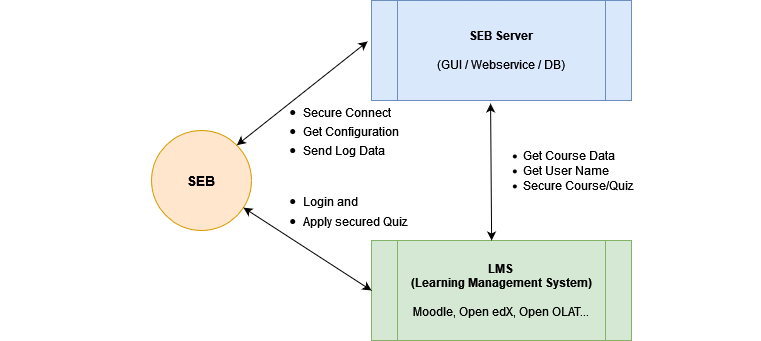
The image below shows a very simplified diagram that locates the SEB Server in a setup with a Learning Management System (LMS) and the Safe Exam Browser (SEB). The SEB Server communicates with the LMS for managing and prepare exams as well as with the SEB Client to ensure a more automated and secure setup for high-stake exams.
Within this new version 3.0 comes a whole new UI (user interface) that integrates the former SEB Server UI and the Screen Proctoring UI in one single UI built with Vue/Typescript. We also adapted the SEB Server setup accordingly and simplified it where possible. Beside of that we have some new features as well as better performance
- New Features:
- Complete new modern Web-UI that integrates former SEB Server and Screen Proctoring UI
- New monitoring overview page where you can see all the most relevant monitoring data of a running Exam right away. You can still show the list of SEB clients and filter it as usual while also go to single client details.
- Full screen proctoring integration within the new UI. You can see the screens of a client within monitoring directly now on the clients detail view. You can also go directly to the gallery view by groups from the new monitoring overview page. Screen Proctoring Search and Application Search are integrated too.
- Exam Template Wizard. A UI wizard that guides you through the steps of creating a Exam Template that is used to import Exams later on. Configuration Templates are automatically generated out of the given SEB Settings within the wizard. No need to maintain them separately anymore.
- Exam Import Wizard. A UI wizard that guides you through the steps of importing an Exam either form an integrated Assessment Tool or by URL. Exam Configurations are generated automatically on import from the Exam Template settings. No need to maintain them separately anymore.
- Scheduled Deletion. New feature the schedule a Exam deletion of all exams that are older then a given date. The delete is scheduled to midnight of the current day and you are able to consult a report of all involved deletions. As long as the scheduled deletion has not be started, you are always able to delete the task. After deletion, the task can still be seen and the reports states successfully and none successfully deletions.
- Exclude from Deletion. This feature allows you to exclude certain Exams from a scheduled deletion task. You can mark an Exam as excluded from deletion to prevent deletion of the Exam by a automated task.
- Improvements:
- Improved User Roles. You only apply one single role for a user now and it gets all privileges from subsequent roles
- Analysis. There is a new analysis section where you can analyse finished exams after monitoring. Search screen proctoring or download SEB logs of the Exam.
- Archivation. There is a new archivation section, where you can archive Exams and maintain excludes from deletion.
- Running on Java 21 ands Spring 3.5 now.
- New SEB Settings now all available in the UI
- Bugfixes:
- Disable any Assessment Tool Setup causes disconnect Exams of other Assessment Tool Setup with Moodle integration.Setup
- Unsynced User Accounts SPS-SEB where new users not properly synchronized with screen proctoring service
- Exam Reimport from Moodle causes SPS data mismatch
- Fix duplicate client indicator entry recovery
- Inactive LMS are still involved in the Exam Update Task
- Missing SEB Settings allowVirtualMachine
- SEB Settings arguments with special chars (or other settings)
- Moodle Integration, Deletion when Moodle is not available leads to inconsistent connection state.
- Moodle Integration: Exam Import fails when there is no Connection Configuration
- Screen Proctoring, all clients are counted instead of only active clients
- Moodle Quiz Recovery error when quizzes in same course has like names --> Moodle Quiz Recovery is disabled now for default
- Access inconsistency for Exam Admin role on SEB Server with SPS Group (Gallery View)
- Save User Account, email, DAO inserts empty string instead of null
- Exam/Quiz description change from Moodle causes errors when description is deleted
- SEB Settings, URLs getting cut in SEB Config
- Missing Features:
- Consider that the new UI is MVP (minimal viable product). And despite the fact that almost all of the former features as be implemented or integrated, there are some few missing features.
- User/Audit Logs are currently not viewable in the UI.
For a migration from a running SEB Server setup with version 2.x to new major version 3.0, please also read the migration guide.
The table below shows available and upcoming SEB client versions that has SEB Server integration support and are compatible with particular SEB Server version. There is an entry for each platform with a beta or testing release date and a official release date.
SEB Server Version 3.0.x
| Platform / OS | Release Version |
|---|---|
| SEB Client for iOS | 3.7.1.1 |
| SEB Client for Mac | 3.7.1.1 |
| SEB Client for Windows | 3.10.3 |
For a complete guide to install SEB Server please go to SEB Server Installation Guide
NOTE
The following is the SEB Server User Guide for the SEB Server version 2.x. Since there is no actual User Guide for version 3.0 yet you can use this as a reference. We will provide you with an actual SEB Server User Guide for version 3.x as soon as possible.
For a complete SEB Server user guide please go to SEB Server User Guide
The SEB Server is currently build and maintained by ETH Zürich and by the Swiss MOOC Service that is founded by leading Swiss universities EPFL, ETH, SUPSI, USI and HES-SO. The Swiss MOOC Service was financially supported from 2018-2020 by the Swissuniversities´ P5 program.
We want to make contributing to this project as easy and transparent as possible, whether it's:
- Give us a star
- Reporting a bug
- Submitting a fix
- Proposing new features
- Becoming a SEB Alliance member
We use github to host code, to track issues and feature requests, as well as accept pull requests. And we use Github issues to track public bugs. Report a bug by [opening a new issue]();
Before enter a new bug-report, ensure the bug was not already reported
Please fill and provide all the information suggested by the bug-report template Great Bug Reports tend to have:
- A quick summary and/or background
- Steps to reproduce
- Be specific and give sample code if you can. Can also be Pseudocode.
- What you expected would happen
- What actually happens
- Notes (possibly including why you think this might be happening, or stuff you tried that didn't work)
We Use Git-Flow for Code Contributions
Pull requests are the best way to propose changes to the codebase. We use Github Flow. We actively welcome your pull requests:
- Fork the repo and create your branch from development. The development branch always has the newest changes.
- If you've added code that should be tested, add tests.
- If you introduce new API also add clear documentation.
- Ensure the test suite passes.
- Make sure your code lints.
- Issue that pull request!
Use a Consistent Coding Style
Have a close look to the existing code stile that is used within SEB Server and adapt to it as close as possible. We reserve the right to adapt contributed code to the code style matching SEB Server code style before or after a pull request.
Any contributions you make will be under the Mozilla Public License Version 2.0
In short, when you submit code changes, your submissions are understood to be under the same Mozilla Public License that covers the project. Feel free to contact the maintainers if that's a concern.
Becoming a SEB Alliance member
The SEB Alliance is the body which sustains ongoing funding of the Safe Exam Browser open source project to continue its maintenance, development and support activities. ETH Zurich provides the infrastructure for the management and the software engineering of the SEB project and appoints an alliance manager who will provide administrative support to the SEB Alliance, and ensure the day-to-day running of the SEB Alliance. ETH Zurich leads the Alliance and offers different contribution levels to parties interested in the evolution of the SEB open source project.
More information about joining the Alliance is available in our benefits and documents section.