Repository navigation
[Extension] Video download overlay is detached from player and overlaps page UI on dynamic layouts (e.g. YouTube) #43

Description

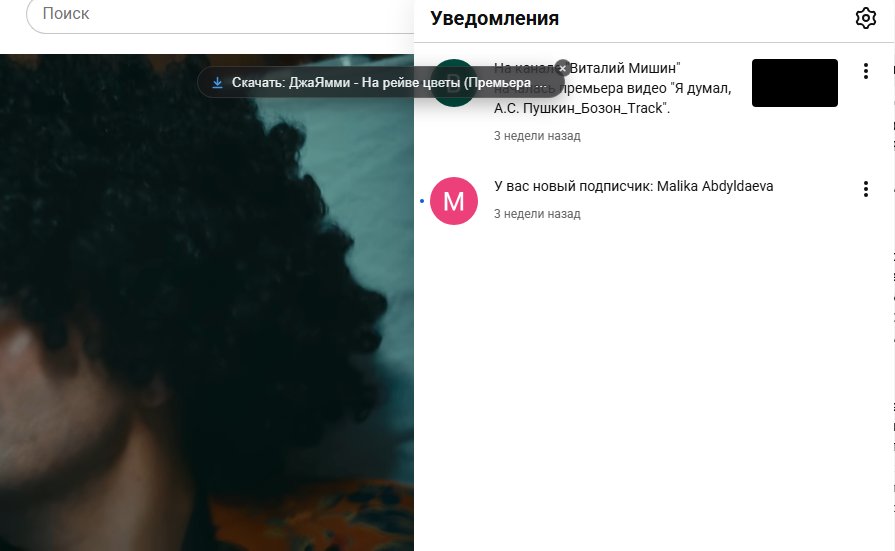
In the browser extension, the floating download overlay (.multron-video) often becomes detached from the actual video player and ends up overlapping unrelated page UI (such as menus, search bars, or notification dropdowns).
Symptoms
When watching videos (for example on YouTube), the download overlay does not stay properly anchored to the video element. As seen in the screenshot below, the button sits halfway across the page and covers YouTube's notification popup:
Root Cause
- Fixed position on document root:
Inextension/content.js, the overlay is appended todocument.documentElementwithposition: fixed;and positioned using absolute viewport coordinates (getBoundingClientRect()). - Missing container scroll & resize tracking:
Positioning updates rely onwindow.addEventListener('scroll')andresize. However, modern single-page applications like YouTube use custom internal scrollable containers (ytd-app/#page-manager), sowindow.scrolldoes not trigger when the page is scrolled or when adjacent panels expand/collapse. - As a result, the button stays frozen at viewport coordinates, overlaps notification popups, or sits halfway between the video and sidebars on standard desktop widths.
Suggested Fixes
- Anchor inside the video player container:
Instead ofposition: fixedon<html>, attach the overlay directly inside the player container (e.g.el.parentElementor standard player wrappers like#movie_player) usingposition: absolute; top: 12px; right: 12px;(orleft: 12px;) so it naturally moves, scales, and hides together with the video. - If kept in root, observe the target with a
ResizeObserverand hook into container scroll events so the overlay stays locked to the video bounds.
Thanks again for the great extension and continuous improvements!
 iemirakman
Thank you for the detailed root-cause analysis and reproduction steps @ripton06!
This exact issue was resolved in v1.0.1 (commit e6bc859). The video download overlay is now anchored directly inside the video player container so it scrolls, resizes, and hides together with the video, keeping site menus, search bars, and notification popups unobstructed on dynamic layouts like YouTube.
Please update to the latest release (v1.0.2) — and reload the updated browser extension package — and feel free to reopen if you notice any edge cases. Closing this issue as completed.
Activity
github-actions commentedon Nov 21, 2026
iemirakman commentedon Nov 21, 2026
Thank you for the detailed root-cause analysis and reproduction steps @ripton06!
This exact issue was resolved in v1.0.1 (commit
e6bc859). The video download overlay is now anchored directly inside the video player container so it scrolls, resizes, and hides together with the video, keeping site menus, search bars, and notification popups unobstructed on dynamic layouts like YouTube.Please update to the latest release (v1.0.2) — and reload the updated browser extension package — and feel free to reopen if you notice any edge cases. Closing this issue as completed.