Repository navigation
High CPU usage (up to 40-50%) in WebView2 due to infinite background blur/aurora animations (even in tray) #42

Description

First of all, huge thanks for v1.0.0 and for implementing the community feature requests so quickly! The update is awesome.
However, after updating to v1.0.0, we noticed very high CPU utilization by Microsoft Edge WebView2 on modest / dual-quad core systems, causing high fan noise and CPU heating even while the application is completely idle or minimized to the tray.
Symptoms
In Windows Task Manager, the WebView2 processes (msedgewebview2.exe) consume ~45% – 50% CPU continuously:
- WebView2: Multron Download Manager (Renderer): ~37% CPU
- WebView2 GPU Process: ~12% CPU
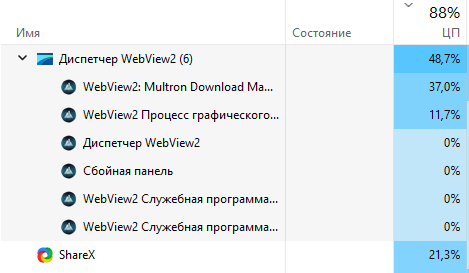
Root Cause
- Infinite heavy Gaussian Blur (
aurora):
Infrontend/src/style.css,.app-root::beforecontinuously runs@keyframes auroraover three radial gradients withfilter: blur(30px). Calculating a 30px Gaussian blur on a full-viewport animated surface at 60 FPS creates massive overhead for Chromium's software/integrated GPU rasterizer. - Animations do not pause in Tray:
When the app is minimized to the system tray (window.hide()), WebView2 does not automatically suspend GPU-accelerated CSS animations, so the renderer keeps drawing the blur in the background non-stop.
Suggested Solutions
- Consider disabling heavy effects by default (or setting Animations to
Off/ Moving background light (aurora) unchecked by default on fresh installs), letting users opt-in if their hardware permits. - Pause rendering / animations when minimized to tray: Add a class (e.g.
motion-offorpaused) to:rootwhenwindow.hide()is called, or suspend them when the window is not visible/occluded. - Replace the animated CSS
filter: blur(30px)with a pre-blurred static asset or a lighter gradient trick that doesn't trigger continuous repaints.
As soon as Animations are switched to Off in Settings, CPU usage instantly drops back to 0.0% - 0.2%, confirming this as the exact culprit.
Thanks again for all your hard work!
 iemirakman
Thank you for the thorough profiling and root-cause breakdown @ripton06!
All of the points you raised were addressed in v1.0.1 (commit e6bc859):
- Looping effects off by default: Continuous animations (including the moving background light / aurora effect) are now disabled by default on fresh installs and turned off once upon updating (they can still be re-enabled anytime under Settings → Appearance → Animations).
- Zero idle & tray CPU usage: Remaining animations now automatically pause when the window is unfocused, minimized, closed to the tray, or after 10 seconds of inactivity, dropping idle CPU usage down to ~0%.
- One-time blur & tray memory optimization: Background blur is now computed …
Activity
github-actions commentedon Nov 21, 2026
Hi @ripton06, thank you for contributing to Multron Download Manager!
🤖 Automated Triage Report
enhancementui-ux,packagingwindowsv1.0.0This issue has been queued for maintainer review. Once @iemirakman or @winball501 responds, the triage status will update automatically.
iemirakman commentedon Nov 21, 2026
Thank you for the thorough profiling and root-cause breakdown @ripton06!
All of the points you raised were addressed in v1.0.1 (commit
e6bc859):Please update to the latest release (v1.0.2) and let us know if you notice any remaining overhead. Closing this issue as completed.