
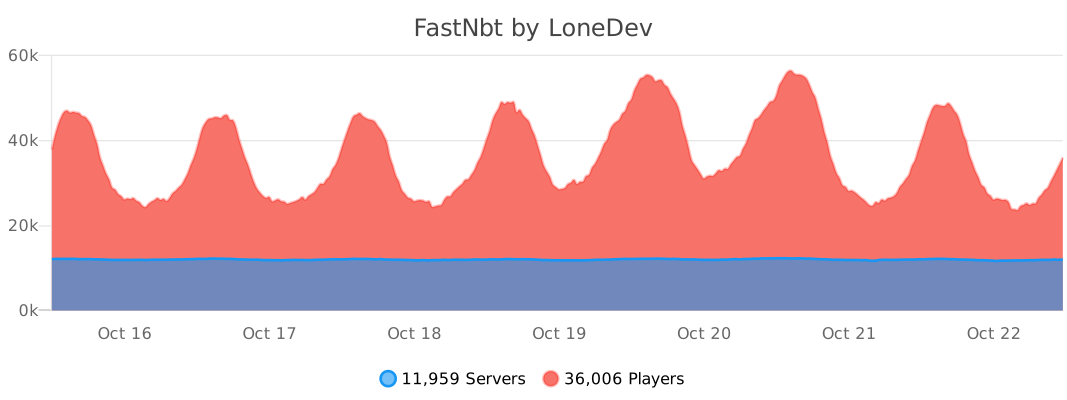
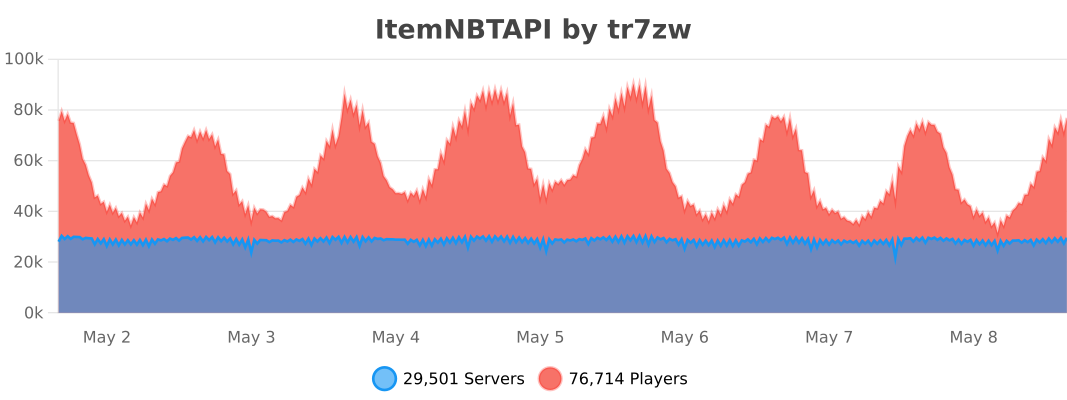
FastNbt is ~190% faster than NBT API.
Check the benchmark here
FastNbt is easier to use compared to NBT API and requires less boilerplate code.
FastNBT writes SkullOwner NBT or the native profile Data Component automatically.
NItem nItem = new NItem(new ItemStack(Material.PLAYER_HEAD));
nItem.setSkull("dummy", "eyJ0ZXh0dXJlcyI6eyJTS0lOIjp7InVybCI6Imh0dHA6Ly90ZXh0dXJlcy5taW5lY3JhZnQubmV0L3RleHR1cmUvYjc4ZWYyZTRjZjJjNDFhMmQxNGJmZGU5Y2FmZjEwMjE5ZjViMWJmNWIzNWE0OWViNTFjNjQ2Nzg4MmNiNWYwIn19fQ==");FastNBT accepts JSON text components for item names. Use the Bukkit API as usual for legacy strings.
NItem nItem = new NItem(new ItemStack(Material.STONE));
nItem.setCustomNameJson("{\"text\":\"Example Name\",\"color\":\"blue\"}");FastNBT writes legacy NBT or modern Data Components automatically, depending on the server version.
NItem nItem = new NItem(new ItemStack(Material.DIAMOND_BOOTS));
nItem.setAttributeModifier(
        AttributeName.MOVEMENT_SPEED,
        AttributeOperation.ADD,
        0.1,
        "movement_speed",
        "feet",
        1337,
        1337
);
Operations are ADD, MULTIPLY_BASE, and MULTIPLY_TOTAL.
AttributeName contains every vanilla attribute and resolves its exact NMS name for the current Minecraft version.
Legacy names such as attackDamage, generic.attackDamage, and horse.jumpStrength are accepted and converted automatically.
Using an attribute before the version that introduced it throws IllegalArgumentException.
The existing String and integer-operation overload remains available for compatibility.
Use the high-level method above for multi-version code. For direct legacy NBT access:
UUID uuid = new UUID(1337, 1337);
NCompound attribute = nItem.getOrAddList("AttributeModifiers", NBTType.Compound).addCompound();
attribute.setString("AttributeName", AttributeName.MOVEMENT_SPEED.getName());
attribute.setInt("Operation", AttributeOperation.ADD.getId());
attribute.setUUID("UUID", uuid);
attribute.setDouble("Amount", 0.1);
attribute.setString("Name", "movement_speed");
attribute.setString("Slot", "feet");
nItem.save();NItem.merge copies the source item's present components when their values
differ from that source item's defaults. It discovers component types from the
item itself, so newly added types do not require a manual merge list. Absent
components, explicit removals and default values do not clear or reset values
on the destination.
CUSTOM_DATA is merged recursively, including when the destination has none.
Source values win on conflicting keys; copied NBT does not share mutable tags
with the source item. ./gradlew check --no-daemon exercises this behavior
against every configured modern adapter using its mapped Paper classes.
Currently, supports only items.

This is the easiest way.
name: Your Plugin
author: You
# ....
libraries:
- beer.devs:FastNbt-jar:VERSIONdependencies {
compileOnly("beer.devs:FastNbt-jar:VERSION")
}This is the easiest way, but requires some special steps.
Shade libby into your JAR, read more here.
Add the lib into libraries-libby of your plugin.yml and specify the --remap flag.
name: Your Plugin
author: You
# ....
libraries-libby:
- beer.devs:FastNbt-jar:VERSION --remapYou need to include this LibsLoader class in your plugin and call in onLoad.
This will load the libraries you specified in the plugin.yml file.
new LibsLoader(this).loadAll();Same as Method 1
You can shade the library in your plugin if you want to use it without connecting to Maven Central.
plugins {
    id("com.gradleup.shadow") version "9.4.1"
}

dependencies {
    implementation("beer.devs:FastNbt-jar:VERSION")
}

tasks.shadowJar {
    relocate("beer.devs.fastnbt", "YOUR_PACKAGE_HERE.libs.beer.devs.fastnbt")
}adapters/versions/<version>/adapter.propertiesdeclares the exact target's Paper dev bundle, Java release/toolchain, output mappings and source variant for each wrapper. This is the only adapter build configuration to maintain.adapters/sources/<wrapper>/<wrapper>_<source-version>.javacontains the canonical Java variants. Each target selects its variants explicitly; no version is selected by proximity or protocol number.adapters/adapter.gradle.ktsis the shared build script. GradleSyncgenerates sources under each version'sbuild/generated/sources/nms/main/javaby replacing only the selected source version suffix in filenames and text.
Edit the canonical sources, not the generated files. A change to a shared variant affects every target selecting it. When behavior differs, add a new variant for that wrapper and select it only for the affected targets.
The Gradle project names remain :fastnbt_nms_<version>. Java package names,
public APIs, Maven coordinates and the final output/FastNbt.jar are unchanged.
Each target still compiles against its own dev bundle; legacy targets use
reobf artifacts, while targets declaring mappings=mojang use their normal JAR.
- Add
adapters/versions/<version>/adapter.properties, using an existing target as a starting point. SetdevBundle,javaRelease,mappings(spigotormojang) and, where required,javaToolchain. - Select each wrapper's source version explicitly.
CompoundTag,CraftItemStack,DataFixer,ListTagandNbtIoare required;DataComponentsandNBTUtilsModernare included where needed. - Add the version to the public
Versionenum, preserving the existing order. Settings and the final JAR discover the target from its manifest automatically. - Run
./gradlew check :FastNbt-jar:shadowJar --no-daemon. The check compiles every adapter, runs the core tests and verifies that configured targets match supported enum entries, excluding documented historical versions and aliases. - Verify new NMS behavior on Spigot and Paper, including NBT round trips and item copy/mirror semantics. Successful generation alone does not prove runtime compatibility.
Create a Central Portal user token and put it in ~/.gradle/gradle.properties:
mavenCentralUsername=TOKEN_USERNAME
mavenCentralPassword=TOKEN_PASSWORD
The deploy uses the default GPG key through gpg-agent. To select one explicitly, add:
signing.gnupg.keyName=KEY_IDRun .scripts/deploy_maven.sh or the Deploy to Maven Central IntelliJ run configuration.
The deployment is validated and left for manual release at https://central.sonatype.com/publishing/deployments.
- Clone it
- Make your changes
- Run
./gradlew build - Use the generated
output/FastNbt.jar
In order to update Javadocs you have to build locally, as old NMS jars are not available and can't be easily included on Github.
- Run
./gradlew :FastNbt-core:javadoc - Get the generated Javadocs from
FastNbt-core/build/docs/javadoc/ - Push the contents into the
javadocbranch
This happens when mappings are out of date. Refresh Paperweight's dependencies and rebuild:
./gradlew build --refresh-dependencies