The most flexible job is the DataOperations, since it represents a series of data operations that are bundled together to create a new job assembled from functionality sometimes found in other jobs.
The order of operations to execute can be set with the Order-property in each operation. What the different data-operations does:
- Get calculated log data
- Calculates a value based on log items in a datalog.
- Can be configured to only use values within a given time frame.
- Sets the result to a WFC resource/destination
- Can only calculate values from numeric datalog.
- Concat
- Can concatenate WFC resources.
- Example:
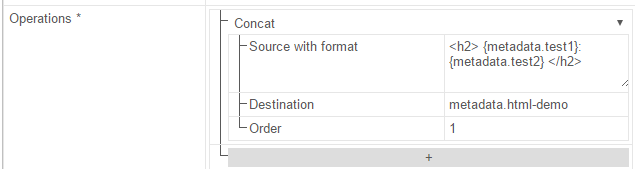
This example is from a demo where the input test1 and test2 were two texts in WFC resources and the result of the concat-operation was used as body in a HTML-email.
With indata: test1 = Workflow, test2 = Hello!
The result was: “<h2>Workflow: Hello!</h2>” Should a specified key have no value, a default value (in this case "1") can be assigned by using the following format; {metadata.key:1}
- Calculate data
- Works like the @{text:CalculateValueFromMetadata;link:calculateValueFromMetaData}@ job does.
- To calculate something based on values in WFC resources this job can be configured with an expression like this:[metadata.counter]+1
- Extract value regex
- Uses the pattern to find a text in the source and puts the result in destination
- Get last log data
- Gets the most recent value from the datalog with the given key.
- Insert regex
- Uses the pattern to find a text in the source, and with the options; insert the given value in the source and place the result in destination.
- Concat group member data
- Data sources with format can be used in the same way as the Concat-operation does with the “Source with format”-property.
- Separator can be a text or a single character that separates each “row” (each group-member)
- An example could be: {phone}: {firstname}, {lastname}
And would result in something like this:
+46701234567: John, Doe +46701234568: Jane, Doe - Reserved words are: {id}/{unitid},{email},{phone},{createdon} everything else will be interpreted as metadata (ex. {test1} would refer to groupmember.metadata.test1)
- Log data
- Will log data to the datalog with the given key.
- Remove regex
- Removes data from the source, based on the pattern and options and put the result in destination.
- Replace regex
- Replaces data in the source, based on the pattern and options and put the result in destination.
- Substring
- Extracts a part of the data in source based on the zero-based index, with a max-length.
- Ex: indata: This is the text in metadata1 with substring startIndex: 0
Will result in: “Test i” if the max-length is 6
- Set data
- Will set the destination to the result of the WFC-resource in source
- Ex. source [datetime()] will result in the current date and time
- More examples in the WFC-resources tips&trix-section
** Notes: This job is more useful once you’ve read about it in tip&trix-section. **
How to: Press the + button and select what operation to add. Set the order of operations with the Order-field. Read about what operation to use in the description above.